What it is
CE-108255-1 is Sony's general 'an error occurred in the application' code, and some PS5 owners keep getting it in GTA 6. The game shuts and drops you to the home screen. Sportskeeda quotes a Reddit user whose game ran for about 40 minutes before crashing, even after reinstalling and rebuilding the database. Instant Gaming says reinstalling, restoring licences and clearing the cache didn't help other players either.
What might cause it
Nobody knows yet. Instant Gaming notes a theory that GTA VI is demanding enough to expose PS5s that weren't fully stable, with overheating, dust and the console's liquid-metal cooling mentioned. It stresses this isn't confirmed. Nerdism cites HappyGamer as saying the roughly 602 MB game update cleared the error for some players. That's single-source.
Fixes to try
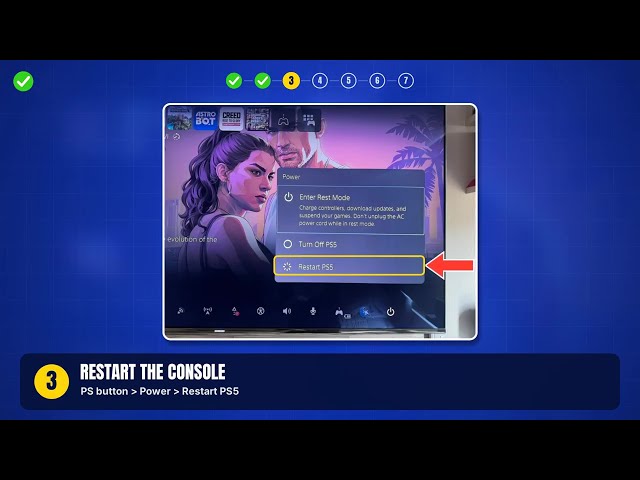
Sony's own help page for this code only says to update the game. The usual troubleshooting order, given in the Guías y Soluciones video and in Sportskeeda's guide, is: update the system software and the game, fully restart the console, keep free space, then run Clear Cache and Rebuild Database from Safe Mode. Rebuilding doesn't delete saves. Reinstall only as a last resort. Sportskeeda also lists restoring PS5 default settings, which keeps games and saves.
Protect your save
Autosaves don't fire as often as many players expect, so a crash can cost real progress. Save manually to more than one slot, as Instant Gaming advises. If the crash keeps happening at the same spot, note what you were doing and report it to Rockstar Support. No game patch has addressed it as of November 20.