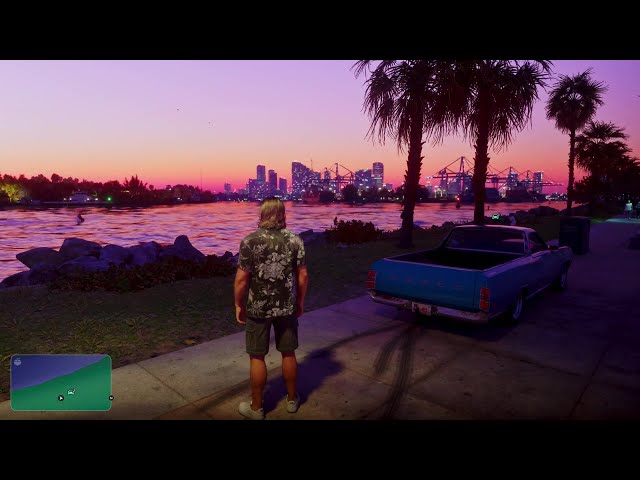
What it is
One of the most common launch complaints is not a crash but a look: GTA 6 darkens the edges of the picture, and most of all the top of the screen, so bright skies can look dim and murky. kevinsmak's video on it says it is one of the most asked questions under his GTA 6 uploads, and GTA6BUGS logged it as a confirmed issue on both PS5 and Xbox.
What Rockstar says
According to TposeGaming, Rockstar's Vice President of Dynamic Art, Michael Kane, confirmed that the vignette is a deliberate artistic choice and that there is no option to switch it off in the current console versions. He also acknowledged that a bug was making the effect stronger than intended in some situations, and said that problem has been fixed. Neither TposeGaming nor GTA6BUGS could say which update carried the fix, and Rockstar has not posted patch notes.
What you can change
Since the effect can't be removed, the advice is to make it less noticeable. TposeGaming suggests going to Pause > Settings > Display > Visual Effects and lowering the Player Status, Hit Effects and Awareness intensity sliders. GTA6BUGS adds that keeping the awareness effect higher helps if you rely on the cop warnings at the screen edges. Rerunning brightness or HDR calibration helps too. kevinsmak checked every settings tab on his own PS5 on November 20 and also found no on/off option.
Myths
Players suspected Jason's and Lucia's sunglasses were causing it. TposeGaming tested this and found shades make the darkening slightly stronger, but taking them off does not get rid of it. One GTA6BUGS reader with a TCL TV found that a TV picture setting changed how strong the dark edges looked, so your display settings matter as well.
Status
Treat this as two things: the intended vignette, which stays, and the extra-strong version, which Rockstar says is fixed. Make sure your game is fully updated. If the top of your screen still looks unusually dark after updating, report it to Rockstar Support with a screenshot.